> For the complete documentation index, see [llms.txt](https://docs.plummerindustries.com/llms.txt). Markdown versions of documentation pages are available by appending `.md` to page URLs; this page is available as [Markdown](https://docs.plummerindustries.com/drive-systems/drive-corners/programming.md).
# Programming
## Choosing a swerve Library
Programming a swerve drive from scratch can be difficult we highly recommend one of the following swerve libraries to make swerve as functional as it can be.
| Name | Link |
| ----- | ----------------------------------------------------------------------------------- |
| YAGSL | |
| CTRE | |
## Specifications needed for programming
Swerve drive systems are complicated systems that only work if everything is correct. Make sure you input the correct values for your library.
{% hint style="info" %}
Units may be different for your library
{% endhint %}
| Name | Value |
| --------------------- | --------- |
| Wheel Diameter | 2.5" |
| Drive Ratio (Mid) | 4 to 1 |
| Drive Ratio (High) | 3.25 to 1 |
| Steering Ratio | 28 to 1 |
| Drive Motors Inverted | False |
| Steer Motors Inverted | False |
## Module Positions
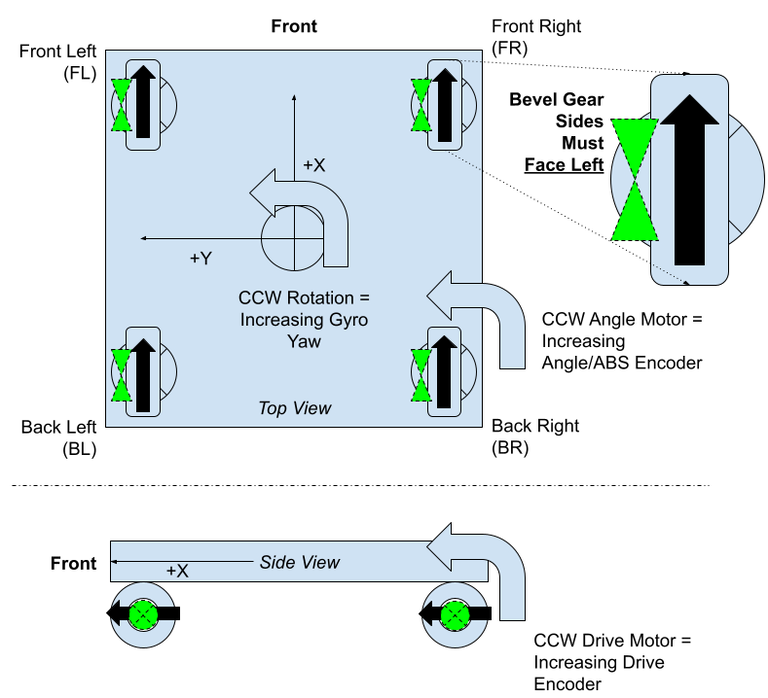
The swerve library will need to know where the swerve module is from the center point of the robot. Instead of guessing we can do some basic math to calculate where the center point of each module is from the center.
If you are using one of the **open corner** variants of the drive corner the center of the wheel is **1.875"** from the outer edges of the frame. If we know the outer dimensions of the robot we can calculate the position from the center of the robot to the center of the wheel.
$$
Position from Center X = (Length Of Robot X/2)-1.875
$$
$$
Position from Center Y = (Length Of Robot Y/2)-1.875
$$
If you are using one of the **closed corner** variants of the drive corner the center of the wheel is **2.875"** from the outer edges of the frame. If we know the outer dimensions of the robot we can calculate the position from the center of the robot to the center of the wheel.
$$
Position from Center X = (Length Of Robot X/2)-2.875
$$
$$
Position from Center Y = (Length Of Robot Y/2)-2.875
$$
{% hint style="warning" %}
Some swerve libraries use metric units for their calculations. You will have to convert from inches to meters before imputing your values.
{% endhint %}
Once you have these numbers most swerve libraries want them in coordinate form. Make sure that your values have the right signs.
| Corner | X | Y |
| ---------------------------- | - | - |
| Front Left (Port Bow) | + | + |
| Front Right (Starboard Bow) | + | - |
| Back Left (Port Stern) | - | + |
| Back Right (Starboard Stern) | - | - |
Taken from YAGSL Docs with permission
## Wheel Offsets
The way we designed our sensors and the drive corners lets us define what the offsets are going to be. Since the target is always above the miter gear and the angle of the sensor is defined by the plate all you need to know to find the offsets is the orientation of your modules in your robot. Follow the image below to find your offsets for your modules. The red arrows indicate the direction of the wires coming out of the sensor.
{% hint style="info" %}
Some swerve libraries/motor controllers pass in analog signals as -180 to +180 where 0 degrees is half voltage instead of 0 to 360 degrees where 0 is 0 volts. We have included both offset types. YAGSL with spark max's use 0-360.
{% endhint %}
{% tabs fullWidth="false" %}
{% tab title="Offsets 0-360 deg" %}
{% endtab %}
{% tab title="-180 to +180 deg" %}
{% endtab %}
{% endtabs %}
{% hint style="warning" %}
If you are troubleshooting your swerve and think you have an offset other than those listed above check your sensor wiring or steer ratio. There may be something wrong.
{% endhint %}
## Starting Motor Values
These are our recommended starting values when tuning your Drive Corners. Through testing, we've determined that these values are optimal for a robot at max weight of 115lbs (not including bumpers and batteries)
### Steering/Azimuth
| Steer Motor | Neo | Kraken x44 | Minion | Cu42 |
| ------------- | ------- | ---------- | ------- | ---- |
| Current Limit | 30 Amps | 30 Amps | 30 Amps | |
| P | .04 | | | |
| I | .00001 | | | |
| D | 0 | | | |
| FF | 0 | | | |
| Ramp Rate | 0 | 0 | 0 | 0 |
### Drive
| Drive Motor | Neo | Neo Vortex | Kraken x60 | Cu60 |
| ------------- | --- | ---------- | ---------- | ---- |
| Current Limit | 50 | 50 | 50 | 50 |
| P | | | | |
| I | | | | |
| D | | | | |
| FF | | | | |
| Ramp Rate | .05 | .05 | | |
{% hint style="danger" %}
These are values that have worked for us. These values may damage a motor if something is hooked together wrong or your robot weight is different.
{% endhint %}
---
# Agent Instructions
This documentation is published with GitBook. GitBook is the documentation platform designed so that both humans and AI agents can read, navigate, and reason over technical content effectively. Learn more at gitbook.com.
## Querying This Documentation
If you need additional information that is not directly available in this page, you can query the documentation dynamically by asking a question.
Perform an HTTP GET request on the current page URL with the `ask` query parameter, and the optional `goal` query parameter:
```
GET https://docs.plummerindustries.com/drive-systems/drive-corners/programming.md?ask=&goal=
```
`ask` is the immediate question: it should be specific, self-contained, and written in natural language.
`goal` is optional and describes the broader end goal you are ultimately trying to accomplish on behalf of the user. GitBook uses it to tailor the answer towards what is most useful for that goal.
The response will contain a direct answer to the question and relevant excerpts and sources from the documentation.
Use this mechanism when the answer is not explicitly present in the current page, you need clarification or additional context, or you want to retrieve related documentation sections.
.png?alt=media&token=151b95ac-0e12-46bc-8c34-87f7cdad245d)
.png?alt=media&token=2cc9afef-4c02-40b6-a7fd-f5cd02b6522b)